


Yi iot
2.512.42K Reviews
App Specs
- Version
- 5.1.5_20260710
- Updated On
- License
- Free
- Downloads
- 10,000,000+
- Developer
- Kami HK
- Categories
- Video Players & Editors
- Platform
- Android, iOS
Screenshots
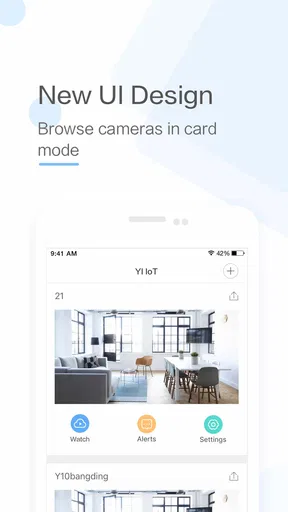
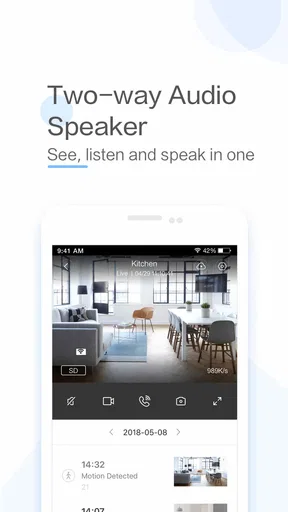
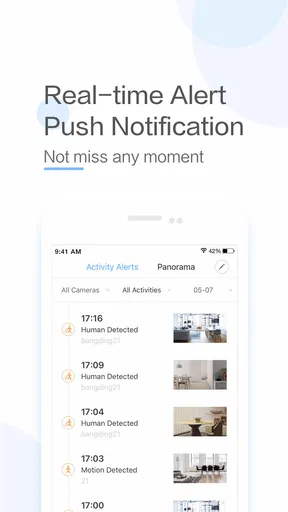
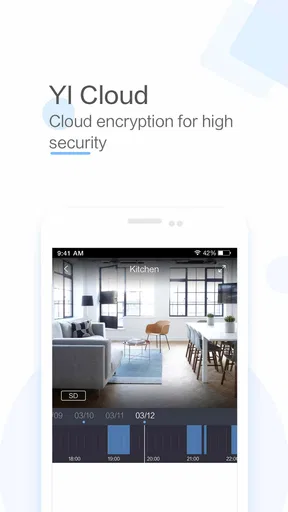
 Analysis by AppCompare
I find Yi iot easiest to understand as a camera companion rather than an all-purpose video app. Its appeal is practical: check a view from elsewhere, listen or speak through a connected camera, and decide whether anything needs attention. That focused role can be useful, but it also means the experience depends on the camera setup and on how comfortable you are placing a connected camera in a private space.
Trust begins with the camera, not just the app
Yi iot is a free video-monitoring app from Kami HK, released in 2018 and now at version 5.0.2_20260115. It has more than 10 million installs, but its average rating is 2.5 from around 120,000 ratings, alongside roughly 12,000 written reviews. I would treat that mixed reception as a reason to set modest expectations and test the exact camera-and-phone combination you plan to use, rather than assuming every setup will feel equally smooth.
The app is rated for Everyone and is listed in the video players and editors category, though its real purpose is narrower than editing or watching general videos. It connects to compatible cameras for remote viewing and audio. That distinction matters: if you want a media player, Yi iot is the wrong tool; if you want a phone-based way to check a camera, it is more relevant.
What I would check before relying on it
With any camera app, I would separate what I can see on screen from what I would need to know about account security and data handling. Before putting a camera in a bedroom, nursery, or shared home, read the current permission prompts and privacy information, and decide whether the camera’s placement and use are acceptable to everyone who may be recorded. I wouldn’t assume that a live view alone tells me how clips, account details, or other information are managed.
My practical advice is to begin with a low-sensitivity location, such as a view of an entryway, and learn the controls before expanding coverage. Check the app’s account and device settings yourself, use a strong, unique password if an account is required, and avoid sharing access casually. These are sensible precautions for a connected camera generally; they are not claims about special protections or settings in Yi iot.
Getting Started with Yi iot
First off, installing Yi iot was a breeze. A quick dive into the Play Store or App Store, and boom, it was ready to roll in no time. Setting it up with my camera was just as easy, thanks to the user-friendly interface. I didn't even need to be a tech wizard to get things working. A few taps here and there, and my camera was linked up like magic.
Once everything was connected, the app's dashboard felt like a command center at my fingertips. The live feed was crystal clear, and I could switch between cameras like flipping through TV channels. It’s perfect for those of us who love keeping everything under control, even when sipping coffee miles away.
Worth Reading Before You Choose

EA SPORTS FC Mobile 26 Is a Bigger Football Game, but It Takes Time

Flipboard Shows What News Apps Must Do Beyond the Feed

Switching to Android Auto Means Rethinking Your Driving Routine

Google Calendar Makes a Crowded Week Easier to Manage

Ludo King Makes the Most of the Minutes Between Plans

Baby Panda World Brings Quick Play to Modern Phones, but Its Game Library Feels Busy
Features and Functionality
Here's where Yi iot really shines. The app offers a plethora of features that make surveillance feel like a walk in the park. From motion detection alerts to night vision, it’s packed with everything you’d expect from a top-tier security app.
The motion detection is particularly handy. I set it up to notify me whenever there was movement in certain areas, like my front porch. I could customize the sensitivity, which meant fewer false alarms from squirrels or passing shadows. The alerts popped up instantly, and I could tap to view live footage right away.
Night vision, on the other hand, was a game-changer. With Yi iot, I could see everything clearly even in complete darkness. It made those late-night checks a whole lot easier and more reassuring.
A calmer way to use alerts
Motion notifications are most useful when they answer a specific question, not when they report every movement near a window. I’d start with a limited view and a moderate sensitivity, then adjust after seeing what triggers alerts during an ordinary day. Trees moving in wind, headlights, and people passing outside can all make a camera feel noisier than expected. If alerts become constant, the feature can lose its value because you may start ignoring the very notification you hoped to catch.
A realistic routine is checking the entryway when a delivery is expected, then opening the live view only if an alert seems relevant. That is less distracting than keeping the camera feed open all day. For a household, it also helps to agree on who will respond to alerts and what counts as a reason to check in, so monitoring does not become an unspoken source of tension.
User Experience
One thing I particularly loved about the app was its intuitive design. Navigating through the menus felt natural, and everything was right where I expected it to be. The developers clearly put a lot of thought into making the experience as smooth as possible.
The two-way audio feature was another highlight. I could listen in and even talk through the app. It was like having a virtual intercom system. Perfect for when I needed to shoo away a delivery guy who didn’t ring the doorbell loud enough!
When speaking through the camera helps
Two-way audio is convenient for a short, clear exchange: asking a visitor to leave a package by the door or letting a family member know you can see them. I would not treat it as a substitute for a normal phone call. A camera speaker and microphone are better suited to brief instructions than sensitive conversations, and sound quality can depend on the camera, phone, and connection involved.
There is also a small etiquette point that is easy to overlook: a camera’s location should make its purpose understandable to people who enter the space. If you use audio or video monitoring where family, guests, or workers may be present, be open about it. The convenience of a quick remote check is not worth creating uncertainty about who is being watched.
Performance and Reliability
Throughout my time using it, Yi iot proved to be reliable. The app didn’t crash or freeze, which is a huge plus. The live streams were smooth, and I rarely experienced any lags. It felt like I was watching a live TV broadcast.
What also stood out was the app’s ability to store footage. With cloud storage options, I could revisit any event that happened while I was away. It’s like having a time machine for my home security, ensuring I didn’t miss a beat.
Footage, costs, and everyday trade-offs
Cloud storage can change the usefulness of a camera: a live feed helps you see what is happening now, while saved footage can help you review an event later. Before choosing a storage option, I would check the current in-app terms and charges carefully. Yi iot is free to download, but it includes in-app purchases ranging from about 49 cents to nearly 480 dollars per item. That is a wide span, so I would not tap through a purchase screen without confirming what the item includes and whether it is recurring or one-time.
For a simple use case, such as checking a pet’s usual resting area while at work, live viewing may be enough. If your reason for installing a camera is to review past activity, make sure the storage arrangement suits that purpose before depending on it. I would also think about how long I actually need recordings and who should be able to access them; keeping a camera feed useful does not require making every room or every moment part of a monitoring routine.
How it compares with other options
Compared with a general video player, Yi iot is purpose-built around a connected camera rather than files stored on a phone. Compared with using a camera’s own controls or a broad smart-home app, its advantage is a direct route to viewing and audio features in one place. The trade-off is that it is not a universal camera manager: its usefulness depends on whether your camera works with it, and people who already manage several devices through another established setup may prefer to keep everything in that system.
I would choose a different option if I needed a dedicated baby monitor with controls designed around that job, a camera platform with a clearly documented set of privacy and account controls that meets particular requirements, or a standard editor for trimming and arranging clips. Yi iot makes more sense when the main task is remote checking, not when the camera is only one part of a more demanding security workflow.
Who should try it—and who should pause
I can see it suiting someone who already has a compatible camera and wants a straightforward way to view it from a phone, especially for occasional checks of an entrance, a room, or a pet’s space. It may also suit a family that values quick two-way contact more than elaborate automation. The Everyone age rating describes the app’s content classification; it does not replace a household’s own decision about camera placement, consent, and supervision.
I would pause if you are buying a camera specifically for a high-stakes security setup and need dependable, well-documented controls before committing. I would also skip it if you do not want a camera account or cloud-related choices to be part of your routine, or if you are uncomfortable reviewing permissions and purchase options yourself. A lower average rating does not prove a particular problem, but it is another reason to test the setup before relying on it for something important.
Final Thoughts
In a nutshell, Yi iot transformed my smartphone into a powerful surveillance tool. Whether you’re a tech enthusiast or just someone looking to keep an eye on things while you’re away, this app is a solid choice. It’s packed with features that make monitoring simple and effective without overwhelming you with complexity.
So, if you’re in the market for an app that offers seamless integration with your security cameras and provides a rich suite of features, give Yi iot a spin. You might just find that peace of mind you’ve been searching for, all wrapped up in an app that’s as easy to use as your favorite social media platform.
My cautious verdict
I would approach Yi iot as a convenient companion for a compatible camera, not as a complete guarantee of home security. Its live viewing, alerts, night vision, audio, and footage storage can make ordinary check-ins easier, but each feature is only as useful as the camera placement, connection, and choices you make around it. Start with one camera and one clear purpose, learn how the alerts behave, and review any storage or purchase decisions before expanding.
That measured approach is why I would recommend trying it to someone who wants remote access and is comfortable evaluating a connected-camera setup for themselves. I would not recommend installing it blindly in sensitive spaces or assuming that a smooth first session settles every privacy question. If the controls and costs fit your needs after a careful test, it can be a practical tool; if they do not, choosing a different camera ecosystem—or no camera at all—is the wiser call.
Pros
- User-friendly interface for easy navigation.
- High-quality live video streaming.
- Motion detection alerts are reliable.
- Supports multiple devices for monitoring.
- Easy setup with clear instructions.
Cons
- Limited cloud storage options.
- Occasional connectivity issues.
- App notifications can be delayed.
- Some features require a subscription.
- No integration with smart home systems.
FAQs for Yi iot
What is Yi iot and what are its main features?
Yi iot is a smart home security app designed to work with Yi cameras. It offers real-time video streaming, motion detection alerts, and two-way audio communication. Users can also store footage in the cloud and access it remotely. The app is available for both Android and iOS devices, making home monitoring convenient and accessible.
Is the Yi iot app compatible with all Yi cameras?
While Yi iot is primarily designed to work with Yi home security cameras, compatibility depends on the camera model and firmware. It's important to check the app's compatibility list to ensure your specific camera model is supported. Regular updates to the app and firmware can also affect compatibility.
What are the subscription options for Yi iot's cloud storage?
Yi iot offers multiple cloud storage plans to suit different needs. Users can choose from monthly or annual subscriptions, with options varying in storage duration and capacity. These plans allow users to store video footage securely in the cloud, ensuring access even if the camera is damaged or stolen.
How does Yi iot ensure the security of my data?
Yi iot employs advanced encryption protocols to safeguard user data against unauthorized access. The app uses end-to-end encryption for video streams and cloud storage, ensuring that only authorized users can access their content. Regular security updates are also provided to address potential vulnerabilities.
Can I use Yi iot without an internet connection?
Yi iot requires an internet connection for most of its features, including live streaming and cloud storage. However, local storage options, like microSD cards, can be used to record footage when offline. For optimal functionality and real-time alerts, a stable internet connection is recommended.


